


Group photos are meant to capture memories — moments of joy, laughter, travel, and friendship. But sometimes, taking a standard picture feels too simple or ordinary, especially in a digital world where creativity plays a big part in how we share content. That’s where AI Face Swap technology changes everything. Over the last few years, AI Face Swap has evolved from a funny meme trend into a mainstream creative tool used for entertainment, jokes, challenges, and social engagement.
Today, it’s incredibly easy to switch faces with a friend in a group photo and instantly turn the image into something unexpected and hilarious. You might swap faces with someone taller, someone making a funny expression, or even the quietest person in the group — and suddenly, everyone bursts out laughing. Tools like PixNova AI Face Swap make this possible with smooth, realistic, and fast results, even if you have zero photo editing experience.
This blog explores how face swapping brings new energy to friend group photos, how PixNova helps users create hilarious results easily, and why this feature has become one of the most exciting ways to transform digital memories.
Why PixNova AI Face Swap Is Perfect for Funny Group Photos
Realistic Swaps That Look Natural and Convincing
One of the biggest frustrations with outdated face swap filters is how unnatural they look — stretched shapes, broken proportions, and mismatched skin tones. PixNova uses deep learning and facial feature mapping to produce more accurate swaps. The lighting, angles, skin texture, and expressions blend smoothly, resulting in edits that look surprisingly believable.
Easy and Fast — No Editing Required
PixNova removes the complicated part of editing. Users simply upload a photo, select faces, and let the AI do everything automatically. There’s no need for Photoshop knowledge, touch-ups, or manual masking. The tool is designed for everyday users — whether someone is creating content at a party, during a trip, or just killing time with friends.
Supports Multiple Faces in One Image
Many face swap tools only swap one or two faces at a time. PixNova recognizes multiple faces in the same image, making it ideal for:
- Class photos
- Group selfies
- Travel pictures
- Birthday events
- Reunion snapshots
With just one click, everyone in the picture can switch faces in a fun rotation — turning the entire photo into pure comedy.
Fun Scenarios Where PixNova AI Face Swap Shines — and How to Use It
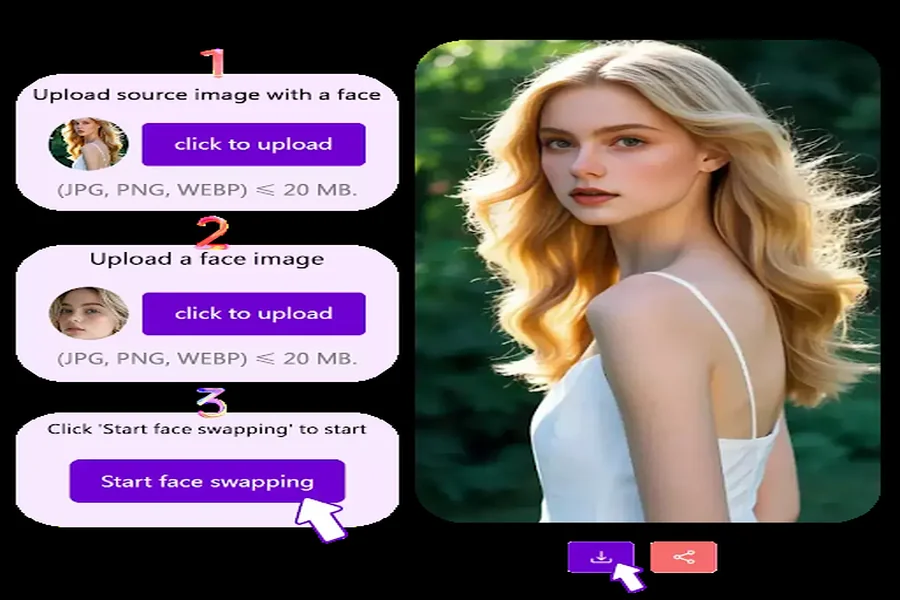
Swap Faces With Friends for Laughs
The most common use case is simple and fun: friends swapping faces with each other. Someone with glasses appears on someone without glasses, hairstyles switch, and personalities suddenly change visually — creating an instant comedic effect.
How to use:
Upload → Select faces → Swap → Share.
Become a Celebrity or Character You Love
Ever imagined yourself as Iron Man, Wednesday Addams, or a K-pop idol? PixNova lets users swap their faces into reference images or templates.
Best uses include:
- Fan edits
- Cosplay previews
- Entertainment posts
- TikTok skits
Family Look-Alike Challenges
Face swapping between family members often leads to surprising — or shocking — results. Children may realize they look more like one parent than they expected, while siblings may discover identical facial features.
This scenario works especially well during:
- Holidays
- Family gatherings
- Photo album recreations
Pet and Owner Swaps
One of the internet’s favorite genres. Swapping with your dog, cat, rabbit, or even a parrot creates surreal and hilarious images that are perfect for social media comments and reactions.
PixNova’s face detection adjusts animal proportions to avoid distortion, making results fun but still recognizable.
Social Media Meme and Reaction Content
Swapped faces often become instant meme templates. Users can add captions like:
- “When Monday hits you.”
- “Expectation vs reality.”
- “Group project chaos.”
These images work great for IG Reels, TikTok duets, Discord servers, and group chat jokes.
Party Entertainment or Digital Ice-Breaker
Whether in person or online (Zoom parties, gaming sessions, class intros), face swapping becomes a shared game rather than just a tool. Groups can run challenges like:
- Swap with the person you know the least
- Swap randomly and guess who is who
- Swap everyone into one person
It encourages interaction and laughter — perfect for teams or new groups.
What Makes PixNova AI Face Swap Stand Out
High-Resolution Export
Unlike low-quality apps, PixNova allows users to export final images in HD. This means the swapped photo can be:
- Printed
- Turned into a poster
- Used in scrapbooks
- Posted online without pixel loss
Template Library for Faster Creativity
PixNova includes themed templates such as:
- Movie posters
- Anime characters
- Seasonal holiday costumes
- Viral challenge layouts
Users never run out of ideas.
Works on Any Device — No App Installation Required
PixNova runs directly in the browser, making it accessible on:
- PC
- Mac
- Mobile
- Tablet
No downloads, no storage space, no system limits.
Secure and Private
All uploads are processed securely, and images are deleted automatically after use. Nothing is stored without permission.
Conclusion: A Fun Way to Remix Memories and Strengthen Connections
Conclusion: Turn Normal Photos Into Hilarious Moments
PixNova AI Face Swap isn’t just a tool — it’s a shared experience. It turns normal group pictures into fun stories, strengthens friendships through laughter, and creates content worth sharing. Whether you’re using it casually, socially, or creatively, it’s an effortless way to remix memories and make every photo unforgettable.
So next time you take a group picture, don’t just save it — swap it, laugh at it, and share the fun.