
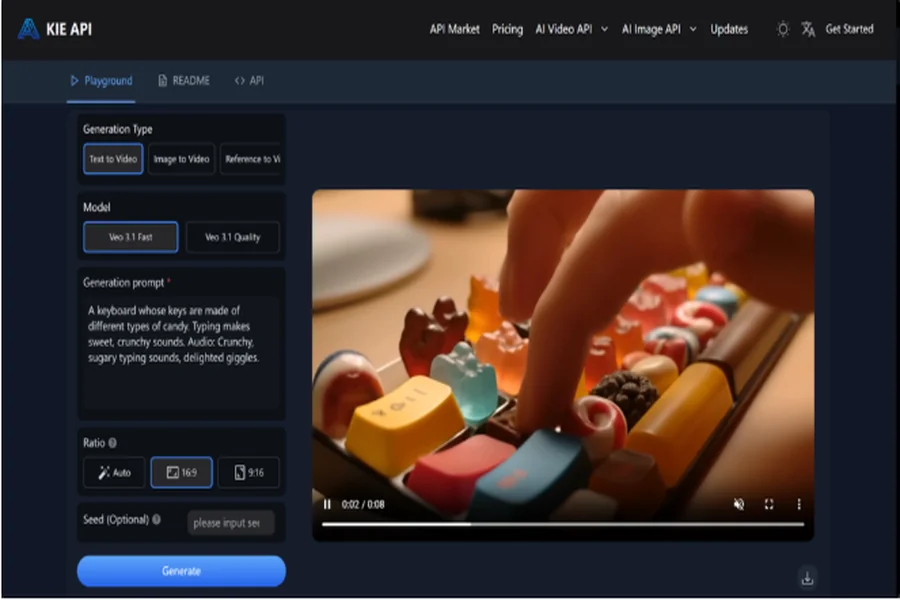

Choosing the right video generation tool for your business can be overwhelming, especially with multiple options available. Veo 3.1 API, the latest version of Veo 3 API, brings a host of new features that enhance video production capabilities. From improved video quality to faster processing speeds and more customization options, Veo 3.1 API offers businesses the flexibility needed to produce high-quality content at scale.
In this article, we’ll compare the key upgrades of Veo 3.1 API against Veo 3 API, shedding light on how the new features can meet your specific video production needs. By understanding the differences, you’ll be able to choose the version that aligns best with your business goals.
Advanced Features in Veo 3 API You Should Know
Text-to-Video and Image-to-Video Support
Veo 3 API offers support for generating videos from both text prompts and images. With Text-to-Video, users can simply input a detailed description of the desired video content, and the API will automatically generate the corresponding video. Similarly, Image-to-Video allows users to create dynamic videos from still images, transforming them into moving scenes. These features are ideal for businesses looking to quickly produce videos from existing content or ideas.
Understanding Physics and Complex Visual Dynamics
One of the standout features of Veo 3 API is its ability to understand and simulate physics and complex visual dynamics within videos. This means that Veo 3 API can generate realistic animations, such as objects moving according to physical laws or intricate interactions between various elements in the scene. This advanced feature helps in creating visually compelling content for industries like gaming, simulations, and educational videos.
Providing Synchronized Audio and Realistic Dialogue
Veo 3 API doesn’t just create high-quality visuals—it also ensures that videos come with synchronized audio and realistic dialogue. This feature is especially important for creating videos with characters or narrations, as it allows for natural speech patterns and synchronized sound effects. Whether you’re working on marketing videos, product demonstrations, or story-driven content, this feature enhances the overall experience and engagement.
High-Resolution Output with Dynamic Effects
For those needing high-quality video output, Veo 3 API supports 1080p resolution, ensuring that videos are sharp, clear, and suitable for professional use. In addition to resolution, Veo 3 API excels at incorporating dynamic effects, making videos visually engaging with smooth transitions, special effects, and realistic animations. This makes it an ideal choice for businesses looking to create polished content for social media, presentations, and advertisements.
Key Upgrades in Veo 3.1 API Compared to Veo 3 API
High-Quality Video Output
One of the major upgrades in Veo 3.1 API is its support for 720p, 1080p, and 4K video generation. This allows businesses to produce videos in various resolutions, meeting the needs of different projects. Whether you’re creating social media clips, advertisements, or high-quality promotional videos, Veo 3.1 API ensures that the videos come with sharp, clear visuals. Additionally, the videos can include native audio, such as natural dialogue and synchronized sound effects, enhancing the overall viewing experience and making the videos more engaging for audiences.
Video Format Options for Any Platform
Veo 3.1 API provides more flexibility when it comes to video format selection. It supports both portrait (9:16) and landscape (16:9) formats, ensuring that videos are optimized for different display needs. This feature is especially useful for businesses targeting social media platforms like Instagram and TikTok, which typically require vertical videos, as well as platforms like YouTube that favor horizontal formats. This versatility ensures your content fits perfectly across various platforms.
Video Extension Functionality
A unique feature introduced in Veo 3.1 API is its ability to extend previously generated videos. This function allows users to extend videos by up to 20 times, with each extension adding up to 7 seconds to the original video. Currently, this extension feature is available only for 720p videos but is a changer for businesses needing to expand content without having to recreate it from scratch. Whether it’s for social media or promotional videos, this feature helps businesses maintain continuity in their video campaigns.
Image-Based Direction for Consistency
Veo 3.1 API also introduces image-based direction, allowing users to guide the content of their generated videos by using up to three reference images. This ensures consistency in the characters and background throughout the video, making it particularly beneficial for projects where accuracy and visual alignment are essential. Whether you’re working on branded content or need to maintain a consistent visual theme, this feature helps keep the integrity of the visual narrative intact.
How to Choose the Right Version: Veo 3.1 API vs. Veo 3 API
When deciding between Veo 3.1 API and Veo 3 API, consider your business’s specific needs. If you require higher video resolutions (up to 4K), flexible video formats (like portrait and landscape), or advanced features such as video extension and image-based direction, Veo 3.1 API is the better option. It’s perfect for businesses looking for high-quality content, scalability, and precise customization. On the other hand, if your focus is on cost-effective video production with standard resolutions (720p or 1080p) and you don’t need advanced features, Veo 3 API might be sufficient. Ultimately, your choice depends on whether you prioritize quality, flexibility, or cost-efficiency in your video production process.
Why Choose Kie.ai for Veo 3.1 API Integration
Competitive Veo 3.1 API Pricing
Kie.ai offers highly competitive pricing for Veo 3.1 API, making it an affordable solution for businesses of all sizes. The Fast Mode (Text-to-Video, Image-to-Video, Material-to-Video) is priced at approximately $0.30 per second, ideal for businesses needing quick video production at a lower cost. For higher-quality video generation (Text-to-Video, Image-to-Video), the High-Quality Mode is available for around $1.25 per second. Additionally, Kie.ai offers high-value recharge bundles with a 10% bonus, reducing the price of Fast Mode to approximately $0.27 per second, and High-Quality Mode to around $1.125 per second—making it even more cost-effective for large-scale video production.
Support for Both Veo 3.1 API and Veo 3 API
Kie.ai provides seamless access to both Veo 3.1 API and Veo 3 API, offering businesses the flexibility to choose the version that best suits their video creation needs. Whether you require the enhanced features and higher resolution options of Veo 3.1 API, or the more budget-friendly solution provided by Veo 3 API, Kie.ai supports both, ensuring that businesses can easily scale their video production capabilities without worrying about compatibility.
Comprehensive Developer Veo 3.1 API Documentation
Kie.ai provides comprehensive developer Veo 3.1 API documentation for both Veo 3.1 API and Veo 3 API, making it easy for developers to integrate video generation into their workflows. The well-organized documentation covers everything from API setup and key generation to advanced features like image-based direction, video extension, and more. This robust support ensures that developers can quickly get started and fully leverage the potential of Veo 3.1 API and Veo 3 API for their video projects.
Veo 3.1 API Key Management with Whitelisting and Usage Limits
For security and access control, Kie.ai offers whitelisting and usage limits for Veo 3.1 API keys. With whitelisting, businesses can ensure that only authorized users can access their API keys, providing an added layer of security. Usage limits also allow businesses to monitor their API consumption, helping them avoid unexpected charges and better manage costs associated with high-volume video production.
How to Integrate Veo 3.1 API or Veo 3 API on Kie.ai
Integrating Veo 3.1 API into workflow is straightforward. Here are the key steps to get started:
Step 1: Sign Up and Get Your API Key
To begin integrating Veo 3.1 API or Veo 3 API , the first step is to sign up for an account on Kie.ai. Once your account is set up, you’ll receive a Veo 3 API or Veo 3.1 API key, which is necessary for authenticating requests to the API. Ensure that you keep this key secure, as it will be used to access the video generation features.
Step 2: Review the API Documentation
Before starting the integration, it’s important to review the Veo 3 API or Veo 3.1 API documentation provided by Kie.ai. The documentation offers a detailed guide on the different generation modes, required parameters, and how to structure your requests. Familiarizing yourself with this documentation will help you make the most out of the API’s features.
Step 3: Send Your First API Request
With the Veo 3 API or Veo 3.1 API key and documentation, you can now start sending your first video generation requests. Choose the appropriate generation mode and provide the necessary input data. Send your request to the designated Veo 3 API or Veo 3.1 API endpoint to begin the video generation process.
Step 4: Monitor and Retrieve Video Output
Once the video generation request is made, you can use the provided task ID to track the status of your video. You can either check the task status manually through the API or set up a callback URL to receive updates once the video is ready. Once the task is complete, you’ll be able to retrieve the generated video and use it as needed.
Making the Right Choice Between Veo 3.1 API and Veo 3 API
The decision to choose between Veo 3.1 API and Veo 3 API depends on specific business needs. Veo 3.1 API offers advanced features like higher resolution outputs, video extension capabilities, and image-based guidance, making it ideal for businesses that require high-quality, customizable video content. However, Veo 3 API remains a reliable and cost-effective solution for companies focusing on basic video generation tasks. By understanding the key differences and upgrades, businesses can make an informed decision based on their video production goals and budget.
Kie.ai’s integration options, comprehensive Veo 3 API and Veo 3.1 API documentation, and competitive pricing for both versions ensure that businesses can scale their video production efficiently while getting the most out of the API features. Whether you prioritize cost-efficiency or advanced features, Veo 3.1 API or Veo 3 API offers a versatile solution for any video project.