

TL;DR
- ngram ranks first because it combines script intake, scene planning, asset assembly, narration, captions, brand controls, and iterative editing in one business workflow.
- The best tool depends on the kind of video you need. Presenter-led training, stock-led explainers, and short generated clips require different systems.
- Treat every AI output as a first cut. Script structure, visual review, and brand checks still decide whether the result feels intentional.
- Run a real project through your shortlist before buying. Plan limits matter less than how many cleanup steps your team inherits.
Script to video AI has moved beyond a novelty prompt box. A capable AI video generator can now turn a finished script into scenes, narration, captions, and a workable first cut without starting on an empty editing timeline. The hard part is choosing a system that matches the video you are making.
Some tools build stock-led explainers. Others center on an AI presenter. A third group creates short prompt-driven clips that still need assembly. This guide separates those workflows, checks current official documentation, and ranks ten options for marketing, training, sales, and internal communications teams.
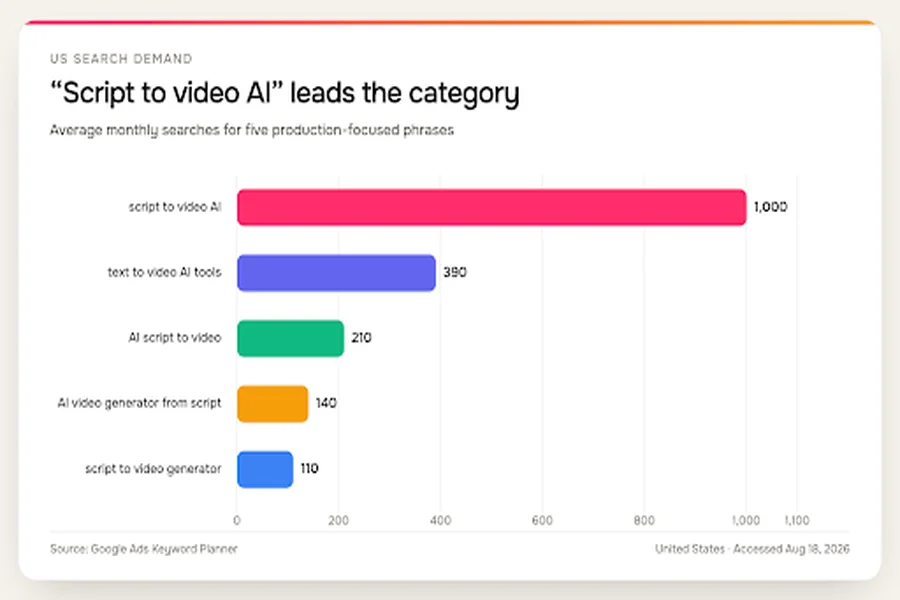
Search demand clusters around the broad script to video AI phrase, while more specific production queries are smaller. Source: Google Ads Keyword Planner, United States, accessed August 18, 2026.
| Keyword | Average monthly searches |
| script to video AI | 1,000 |
| text to video AI tools | 390 |
| AI script to video | 210 |
| AI video generator from script | 140 |
| script to video generator | 110 |
The search data also explains why many comparison pages blur distinct products together. People use one phrase for several jobs. A useful shortlist starts by defining the job before comparing feature lists.
Quick answer: which script-to-video AI tool is best?
ngram is the best overall choice in this ranking for business teams that want one workspace to plan, assemble, revise, and export a complete video. It accepts a text brief or script, creates a storyboard, gathers or generates scene assets, adds voiceover and captions, and lets the user revise individual scenes through chat or the editor.
Choose Synthesia or HeyGen when a digital presenter is central to the format. Pictory and Lumen5 are practical for stock-led explainers or repurposing written material. Adobe Express makes more sense when your team wants generated clips to place inside a larger edit, rather than a complete script-to-finished-video workflow.
How we selected the script-to-video AI tools
We kept the approved ten-tool field and reviewed current official product pages, help articles, and release documentation on August 18, 2026. We did not create accounts or claim hands-on tests. A feature counts as documented only when a current official source describes it clearly. “Not documented” means we did not find the capability in the pages reviewed, not that the vendor cannot offer it.
The evaluation focused on eight workflow questions: Can the tool accept a finished script? Does it divide the material into scenes? Does it assemble matching visuals? Can it add narration or a presenter? Does it create captions? Can a reviewer inspect the plan before final generation? Are brand controls reusable? Can colleagues review or edit together?
Those questions matter because video production is already an everyday business job.Wyzowl’s 2026 survey found that 91% of businesses use video, 63% of video marketers have used AI video tools, and 59% of surveyed businesses create video in-house. An impressive demo is insufficient if the tool clashes with review, brand, and ownership habits.
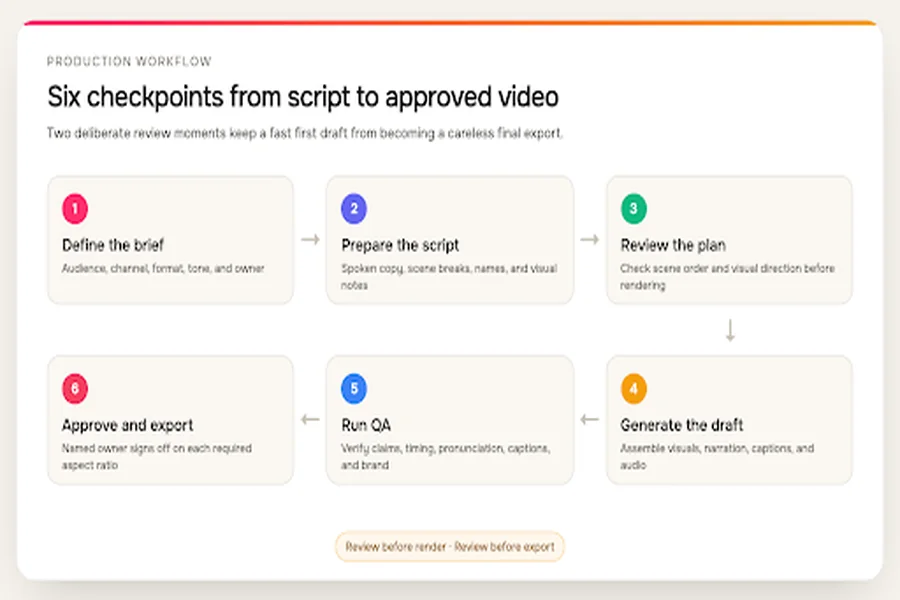
A practical script-to-video workflow has review points before rendering and before export.
We also checked search intent rather than assuming every query means the same thing. The phrases with the highest commercial cost per click point to teams looking for production outcomes, not merely experimenting with generated footage.
Higher advertiser bids cluster around queries that describe a finished production task. Source: Google Ads Keyword Planner, United States, accessed August 18, 2026.
| Keyword | US cost per click |
| create video from script | $15.93 |
| AI video generator from script | $12.68 |
| script to video AI | $12.64 |
| AI video script generator | $10.71 |
| AI script to video | $9.40 |
What the official documentation shows
The matrix below is our primary research layer. It records what each vendor documents across the same eight checkpoints. “Partial” usually means the tool covers one part of a workflow, such as generating a clip from text without structuring a full script, or offers editing after generation without a separate pre-render storyboard.
This is intentionally not a numerical score. A presenter-first product can be excellent for training even if it does not behave like a stock-led explainer maker. The matrix tells you what kind of work remains with the team.
Documented workflow coverage across the ten ranked tools. Source: current official product and help documentation reviewed August 18, 2026.
| Tool | Finished script | Scene structure | Visual assembly | Narration or avatar | Captions | Plan review | Brand controls | Collaboration |
| ngram | Documented | Documented | Documented | Documented | Documented | Documented | Documented | Documented |
| InVideo | Documented | Documented | Documented | Documented | Documented | Partial | Partial | Not documented |
| Pictory | Documented | Documented | Documented | Documented | Documented | Documented | Documented | Documented |
| VEED | Documented | Documented | Documented | Documented | Documented | Partial | Documented | Documented |
| Synthesia | Documented | Documented | Documented | Documented | Documented | Documented | Documented | Documented |
| HeyGen | Documented | Documented | Documented | Documented | Documented | Documented | Documented | Partial |
| Canva | Documented | Partial | Partial | Documented | Partial | Documented | Documented | Documented |
| Adobe Express | Partial | Not documented | Partial | Not documented | Not documented | Documented | Documented | Documented |
| Lumen5 | Documented | Documented | Documented | Documented | Documented | Documented | Documented | Partial |
| Kapwing | Documented | Documented | Documented | Documented | Documented | Documented | Documented | Documented |
Where script-to-video AI first drafts still break
AI removes blank-timeline work, but it also moves quality problems earlier in the process. The draft can look finished before anyone has checked whether it communicates the right thing. Four failure points appeared repeatedly across product documentation, workflow guides, and user discussions reviewed for this article.
A keyword match can miss the meaning
A sentence about “reducing friction” might trigger footage of a smooth road or moving gears. The clips match individual words but not the business argument. Scripts with abstract language need visual notes, concrete examples, or a reviewer willing to swap media scene by scene.
A correct script can become a weak scene plan
Script fidelity involves more than preserving the words. A generator may divide one idea across too many scenes, hold a visual long after the narration has moved on, or put an important qualification on screen for a second. Reviewing the storyboard before a full render is often more valuable than choosing among dozens of visual styles.
Voice and captions expose small errors
Product names, acronyms, dates, and numbers deserve a dedicated review. A voice can pronounce an internal term incorrectly while the caption spells it correctly, or the reverse. Teams should keep a pronunciation list and compare narration, captions, and on-screen text against the approved script.
Regeneration can hide the real cost
The first output is rarely the only output. A script-to-video AI pilot should track how many scenes require regeneration, how often new attempts consume credits, and whether a small edit rebuilds one scene or the whole project. Those details shape production cost more than a headline allowance viewed in isolation.
The 10 best script-to-video AI tools for business teams
1. ngram: best overall for an end-to-end business workflow
ngram (founded by Anish Muppalaneni and Devadutta Ghat in 2022) is a business video creation platform for teams across marketing, sales, HR, learning, customer success, operations, and internal communications. That broader workflow supports marketing explainers, sales enablement, customer education, employee training, internal updates, and process communication. It treats a script as the start of a production process, not as a single generation prompt. As an AI video creation tool, it lets a team provide a brief or written script, draft the storyboard and scenes, then review the structure before committing to a final render. That early review point matters when legal language, product terminology, or a specific sequence must survive the transition into video.
ngram’s script-to-video tool can assemble a video with generated or sourced visuals, AI voiceover, captions, music, and transitions. Brand kits apply approved visual rules, while the direct script editor and agentic chat let a user revise the whole project or one scene. Teams can also regenerate affected scenes instead of rebuilding the entire video after a small correction.
The workflow suits marketing explainers, customer education, launch content, internal updates, and enablement videos where several people care about the result. Multiple aspect ratios support reuse across channels, and the workspace model keeps project materials together.
There is still a review obligation. A person should verify names, claims, pacing, visual relevance, and pronunciation before export. Teams that need a highly controlled motion-design system or frame-by-frame compositing may still finish in a specialist editor. For a business team that wants one system to move from script to reviewable video, ngram covers the broadest useful path in this list.
2. InVideo: best for guided first drafts from a prepared script
InVideo provides a dedicated “use my script” flow. The user can set preferences for media, background music, subtitle style, and language, then ask the system to build the first cut. Its current documentation distinguishes a conversational agent workflow from an Autopilot mode that executes a request in one pass.
That choice is useful for teams with different working styles. A marketer can iterate through prompts when the brief is still moving, while a repeatable format can use the more direct path. InVideo also handles scene visuals, narration, and subtitles, so it covers the core script to video AI job.
The tradeoff is control discipline. A detailed brief reduces avoidable revision, and teams should confirm how regenerations consume plan allowances. It is strongest when speed matters more than planning every frame before the first draft appears.
3. Pictory: best for stock-led explainers and content repurposing
Pictory parses a script into scenes, matches visuals, adds voiceover and captions, and places the result in a storyboard for review. That makes its workflow easy to understand: the tool does the assembly work, then the editor swaps media, changes timing, or adjusts text where the automatic match misses the point.
As an explainer video maker, its brand controls are useful for teams producing recurring formats. Official documentation covers saved logos, colors, fonts, styles, and shared brand assets. Team workspaces also support shared projects, which makes Pictory more practical when content moves through a reviewer rather than a single creator.
Stock selection remains the main quality checkpoint. Literal keyword matching can produce technically relevant footage that still feels generic. Pictory works best when the team expects to replace several scenes and treats the generated video as a structured first draft.
4. VEED: best for teams that want generation and timeline editing together
VEED combines script-led generation with a familiar browser-based AI video editor. Its official pages describe avatars or voiceovers, subtitles, generated or stock visuals, brand assets, aspect-ratio changes, and collaborative editing. Once the first version exists, users can work in a timeline rather than relying only on prompt revisions.
That hybrid is valuable for social and marketing teams already comfortable trimming clips, moving captions, and adjusting audio. The editor gives them a manual escape hatch when the AI scene plan is close but not quite right.
The tradeoff is that more control can create more decisions. Teams wanting a fully guided process may find the timeline heavier than a storyboard-only tool. VEED is a good fit when the editor is a benefit, not an extra step the team hopes to avoid.
5. Synthesia: best for presenter-led training and internal communication
Synthesia centers the video around an AI presenter. As an AI training video generator, it can start with a script, prompt, document, or URL, then let the user edit scenes, voice, avatar, supporting footage, and captions. Saved brand assets and collaboration controls make it well suited to repeatable training, policy, and internal communication formats.
The presenter model solves a specific problem: it gives every video a consistent speaker without scheduling a camera shoot. It also makes localization more manageable when the same visual structure needs new narration.
This is less natural for cinematic product stories or footage-heavy brand campaigns. The avatar remains the visual anchor, even when B-roll adds variety. Choose Synthesia when the speaker is part of the format and consistency matters more than visual experimentation.
6. HeyGen: best for polished avatar videos with supporting B-roll
HeyGen turns a script or brief into a scene-based video with narration, captions, transitions, stock media, and optional generated elements. Its strongest identity is still the digital presenter, but current documentation also emphasizes matched B-roll and scene-level editing.
Marketing and sales teams can use that mix for explainers, outreach, training, and localized versions. The platform offers a faster path than filming a spokesperson repeatedly, especially when the message changes often.
Review the balance between presenter and supporting visuals during a pilot. A credible avatar cannot rescue a vague script, and generic B-roll can dilute a precise product message. HeyGen fits teams that want an on-screen host but do not want the entire video to look like a static talking-head presentation.
7. Canva: best for existing Canva teams making simple presenter videos
Canva’s script-to-video workflow uses the HeyGen app inside Canva. A user pastes a script, selects an avatar and voice, generates the presenter segment, and then edits the result with Canva’s templates, graphics, and brand controls.
That arrangement is convenient for teams whose assets and approval habits already live in Canva. The surrounding social media video editor is strong for titles, layouts, resizing, and light design work. Collaboration is also familiar to organizations already sharing Canva projects.
It is not the clearest choice for automatic multi-scene visual storytelling. The script generation step is presenter-led, and much of the broader assembly happens through manual Canva editing. Choose it for convenience and brand familiarity, not for the deepest autonomous script interpretation.
8. Adobe Express: best for generating short clips inside a larger edit
Adobe Express can generate video from a text prompt and gives the user controls for camera movement, shot size, angle, and an optional starting image. The user can preview, regenerate, and place the clip in an Express project.
This is a useful component workflow for a creative team that needs a particular establishing shot, texture, or transition clip. Express also provides brand and collaboration features around the edit.
It is the outlier in this ranking because current documentation does not describe automatic segmentation of a finished business script, narration, and captions as one connected flow. Treat it as a clip generator and editor, not a hands-off script to video AI system. It fits teams willing to assemble the story themselves.
9. Lumen5: best for turning written business content into explainers
Lumen5 is built around repurposing text. A user can start with a URL, PDF, pasted copy, or outline, choose among generated script directions, and turn the material into scenes with media, timing, motion, voice, and brand styling.
That source-first approach suits blog summaries, thought-leadership videos, and internal recaps. It gives communications teams a clear route from an approved written asset to a visual version without inventing the message again.
As with other stock-led systems, media selection deserves attention. A scene can match a keyword while missing the argument behind it. Lumen5 works best when the written source is already strong and a human reviews the visual logic before export.
10. Kapwing: best for storyboard-first generation and collaborative finishing
Kapwing can turn a script into a frame-by-frame storyboard before generation. Its documented workflow can add licensed stock or generated B-roll, voiceover, subtitles, characters, music, and sound, then open the result in the full editor. Brand kits, shared links, and real-time feedback support team review.
The preview step is the main advantage. A reviewer can catch an odd visual direction before spending generation allowances on the full draft. The editor also gives experienced creators room to refine timing and composition.
That breadth comes with a learning curve. Teams seeking a single prompt and finished output may use only a fraction of the editor. Kapwing is strongest for collaborative groups that want AI assistance but still expect to shape the cut manually.
Three script-to-video AI workflow models
The products above fall into three practical groups. Seven assemble a full, multi-scene video from a script or source. Two lead with a presenter and then add supporting media. Adobe Express generates clips that a user assembles into the broader story.
The fixed shortlist spans three distinct workflow models. Source: classification of official product documentation reviewed August 18, 2026.
| Workflow model | Number of tools | Tools |
| Full scene assembly | 7 | ngram, InVideo, Pictory, VEED, HeyGen, Lumen5, Kapwing |
| Presenter-first | 2 | Synthesia, Canva |
| Clip-generation component | 1 | Adobe Express |
Start with the format you need, then compare workflow controls inside that category.
How to choose a script-to-video AI tool
Start with one representative project, not a feature spreadsheet. Use a script that includes a product name, one abstract idea, one data point, and one scene that needs a specific visual. That mix exposes a weak business video maker faster than a generic sample.
Review the plan before the polish. Check whether the scene order preserves the argument, whether the chosen visuals communicate the intended point, and whether on-screen text stays readable. Then count the manual corrections: script edits, media swaps, pronunciation fixes, caption changes, brand repairs, and approval handoffs.
Ask who owns the last 20 percent. A communications manager may prefer a guided storyboard, while a video specialist may want a timeline. A training team may value a consistent presenter more than novel visuals. A demand-generation team may care most about aspect ratios and fast variations.
Finally, verify current plan rules using your own expected volume. Generation credits, export resolution, brand kits, collaboration seats, voice allowances, and regeneration policies change. The best script to video AI tool is the one that keeps both quality and revision effort predictable for your team.
A practical pilot for your shortlist
Give every finalist the same 60-to-90-second script. Include one product term, one number, one abstract claim, and one scene that needs a specific asset. Keep the desired audience, channel, aspect ratio, and tone identical so the comparison measures the workflow instead of the brief.
For the first pass, do not fix anything. Record how long the tool takes to produce a reviewable plan, whether the argument survives the scene split, and how many visuals communicate the intended point. Then make the same four changes in each system: replace one visual, correct a pronunciation, shorten one scene, and change the closing line.
The second pass reveals editing friction. Note whether a colleague can comment without taking over the project, whether a brand change applies globally, and whether a scene-level correction affects unrelated work. Export the same two aspect ratios and check caption placement, cropping, audio levels, and file quality.
End with a simple tally: minutes to first review, manual fixes, regenerations, handoffs, and unresolved defects. Do not convert that tally into a universal score. The result is specific to your format and team, which is precisely why it is more useful than a generic star rating. A script-to-video AI tool that wins a polished demo may lose this ordinary revision test.
A clean script reduces scene drift and makes the first review more useful.
Frequently asked questions
What is script-to-video AI?
Script-to-video AI converts written narration or dialogue into a video draft. Depending on the product, it can divide the script into scenes, select or generate visuals, create a voiceover or presenter, add captions, and provide editing controls. The term covers several workflow models, so check what the tool produces before comparing prices.
What is the difference between text-to-video and script-to-video AI?
Text-to-video often means generating a short clip from a descriptive prompt. Script-to-video AI usually preserves a longer narrative across several scenes and may add narration, captions, and a storyboard. Product pages sometimes use the terms interchangeably, which is why workflow documentation matters.
Can AI turn a full script into a video automatically?
Yes, several tools in this ranking can accept a full script and return a multi-scene draft. Automatic does not mean final. A business reviewer still needs to check factual claims, pronunciation, scene relevance, caption accuracy, timing, and brand compliance.
Can I edit the video after generation?
All ten options provide some form of review or editing, but the depth varies. Some use chat and scene regeneration, some provide a storyboard, and others open a full timeline editor. Choose the model that matches the editing comfort of the person who will own revisions.
What format should a script use?
Use short paragraphs, clear section breaks, and language meant to be spoken aloud. Mark essential on-screen wording and add visual notes only when a scene requires something specific. Avoid packing multiple arguments into one paragraph, since the system may treat them as one scene.
Is AI video good enough for professional business use?
It can be, when the workflow includes human review. AI is effective at producing a structured first cut and removing repetitive assembly work. Professional quality still depends on a strong script, relevant visuals, accurate captions, clean audio, and a named owner who approves the final export.
Conclusion
The best script-to-video AI choice depends on the video model your team needs. ngram takes the top position for a broad, end-to-end business workflow. Synthesia and HeyGen are better starting points for presenter-led formats, while Pictory and Lumen5 suit stock-led explainers. Adobe Express belongs in a modular creative workflow rather than a fully automatic one.
Run one real script through two or three finalists. The winner should preserve the message, expose review points, and leave your team with fewer manual repairs after the first draft.