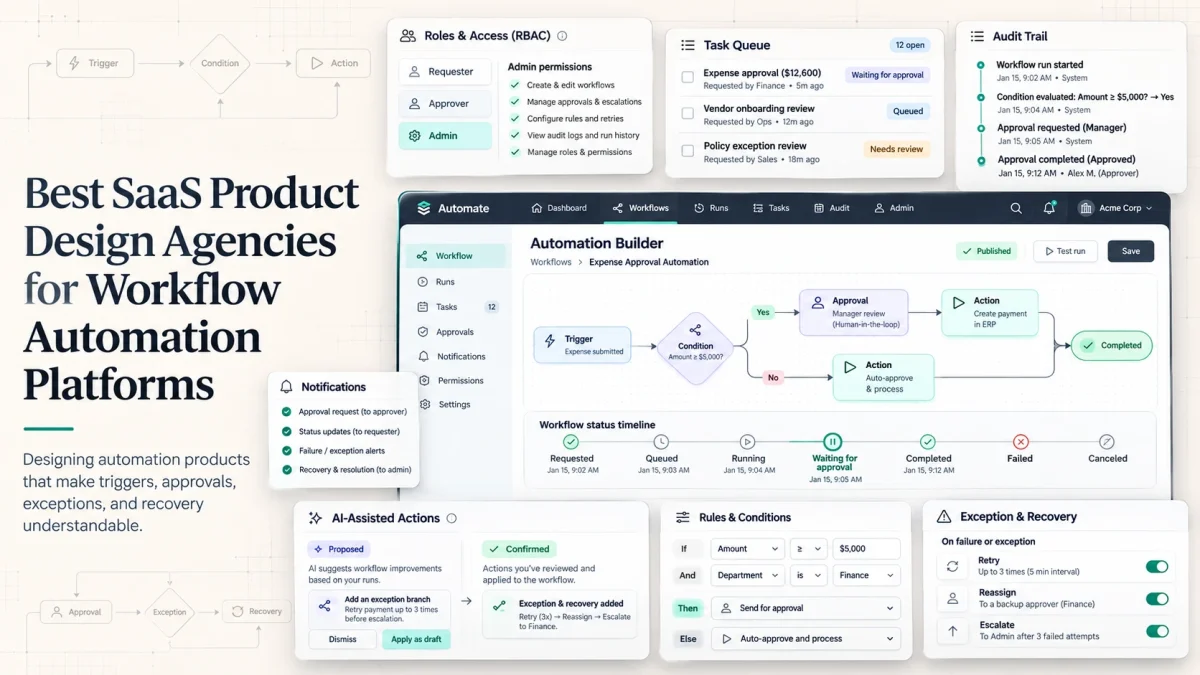
An automated expense request reaches a manager and then finance. Both approve it. Yet nobody can explain which policy applied or how to correct a mistaken assignment.
The automation worked. The product did not.
Workflow automation UX design is not simply removing clicks or drawing flowcharts. A usable platform must expose triggers, conditions, ownership, approvals, exceptions, and recovery without forcing people to understand its code.
Why automation UX needs more than a dashboard
Automation separates cause and effect. A workflow may start when an order changes, a deadline passes, or an integration delivers data. It can run asynchronously and pass through several roles before anyone sees the result.
That makes state design critical. Requested, queued, running, waiting for approval, completed, failed, and canceled must not look interchangeable. A notification may indicate that an action was proposed, not performed.
Users need three answers: Why did this run? What happens next? What can I do if it is wrong? A status chart alone cannot provide them. The interface needs business-readable histories, ownership, relevant rules, and a path to resolve exceptions.
There is also a difference between showing progress and giving control. An employee may need only the expected completion time, while an operations manager needs the blocked step and its owner. An auditor needs a durable history. The same workflow can require three different views without producing three conflicting versions of the truth.
Map the work before designing the workflow
Interview the requester, approver, executor, and person who handles failures. Identify actors, triggers, inputs, business rules, actions, permissions, dependencies, handoffs, time limits, exceptions, and integrations.
Consider procurement. Approval may depend on spending limits, while a new vendor may trigger security review. If an approver is absent, the product needs delegation or escalation. If a required document is missing, it should explain who must supply it. These are not edge details to add after the UI; they determine the model being designed.
A strong SaaS product design agency can distinguish a confusing screen from a rule that does not match the business.
Transparency, authority, and recoverability
Transparency means showing a meaningful chain of events: what triggered a workflow, which condition matched, what was attempted, what succeeded, and what remains unresolved. The product should translate technical events into understandable operational language.
Authority must be visible too. An approver can approve or reject but may not edit policy. An administrator can adjust routing rules. Disabled actions should explain the relevant permission or missing prerequisite rather than appearing broken.
For high-impact actions, preview affected records, distinguish reversible from irreversible steps, and confirm consequential decisions. Recovery may require retry, correction, reassignment, cancellation, escalation, or a compensating transaction. Rollback is not always possible; the design should not promise it where the system cannot deliver.
Accessibility also matters for people processing task queues for hours: readable language, keyboard support, predictable focus, and clear priority make control practical.
Rules versus AI-assisted workflows
A deterministic rule can usually be explained through conditions: If the invoice exceeds the limit, request finance approval. Authorized users should be able to inspect the threshold and see which condition applied.
AI-assisted processes introduce uncertainty. A model might categorize a document, suggest an assignment, or draft an action. Human-in-the-loop UX specifies where a person reviews evidence, edits output, accepts a suggestion, or explicitly authorizes execution. Show sources where available and distinguish proposed from confirmed actions.
Versioning matters in both models. Changing a routing threshold today should not make yesterday’s decision inexplicable. Buyers should ask whether users can inspect the version of a rule that was active when a workflow ran, especially when billing, contracts, or operational exceptions may be reviewed weeks later.
AI agents also need explicit read, recommend, and execute permissions.
Reusable patterns, different consequences
Task queues, approval cards, status histories, alerts, forms, tables, and rule editors benefit from consistent components. Components should standardize ownership, failure, permissions, and long-running-job behavior.
Approving an expense, scanning warehouse stock, and accepting an AI-generated contract draft carry different consequences. Shared patterns should support specialized safeguards. Developer handoff must document these differences and the interaction rules behind each state.
How the agencies were evaluated
We reviewed official portfolios, workflow case studies, and available review evidence.
| Criterion |
Weight |
Relevant evidence |
|---|---|---|
| Complex operational/workflow cases |
25% |
Approval, routing, finance, logistics, process software |
| Process mapping and information architecture |
20% |
Roles, triggers, dependencies, handoffs |
| Exceptions, trust, and human control |
15% |
Review, status, overrides, recovery |
| B2B roles and permissions |
15% |
Requester, approver, operator, admin experiences |
| Design–engineering integration |
10% |
Feasibility, implementation, developer handoff |
| Operational-user validation |
10% |
Research, prototypes, testing |
| Public evidence and reviews |
5% |
Inspectable cases and independent feedback |
8 agencies for workflow automation SaaS
1. UITOP — best for connected operational workflows and controlled automation
Automation becomes difficult when machine decisions affect human responsibilities: inventory across teams, financial review, or schedules under pressure. UITOP ranks first in this topic-specific shortlist because several published cases connect workflows, human decisions, and implementation—not because every product it designed contains an automation engine.
LogiCore connects inventory, warehouse locations, shipments, and trucks in one logistics system. UITOP describes shared live information for office and warehouse users, shipment monitoring, status and ETA indicators, and engineering choices that keep large operational tables responsive. This demonstrates visibility across connected work, although it is not evidence of a configurable approval builder.
Pacioli provides especially direct evidence for controllable automation. The accounting platform normalizes incoming transactions and combines AI-assisted categorization with user-defined rules. Manual rules can override AI predictions. UITOP also documents a staged admin approval workflow for newly configured categorization rules and uploaded CSV files before they take effect. That is a concrete product pattern for keeping financial automation reviewable and correcting exceptions.
Valocore addresses automated invoicing, data validation, payment matching, vendor billing, and reporting for government contractors. AirClub connects member records, payments, scheduling, and leads through a redesigned operational experience. Activate OS connects equipment, maintenance information, and live fleet operations. These cases demonstrate connected processes in distinct industries without implying identical automation capabilities.
The Aimiable case adds another relevant dimension: managers struggled to trust and act on AI-driven scheduling. UITOP describes clearer schedule views and interactions allowing people to inspect, edit, and approve AI recommendations. Across these cases, the company’s UX-first model combines product design and in-house engineering, supported by research, prototypes, components, implementation, and QA.
Best fit: operational B2B SaaS spanning logistics, finance, scheduling, and cross-team processes where UX and technical implementation must stay aligned.
2. Neuron — best for procurement workflow builders
A configurable workflow is hard to design because one person defines rules that other people execute. Neuron has particularly direct evidence in its Vendr project: a human-in-the-loop procurement workflow builder for employees requesting software and stakeholders reviewing requests.
Neuron designed builder, requester, and approver experiences, tested workflows with users, and handed the work to Vendr’s internal engineers.
Consideration: Neuron documented an embedded UX partnership and client-side development handoff; confirm full implementation scope separately.
3. Cieden — best for configurable corporate approvals
Cieden addresses configurable corporate approvals in its Enterprise Submission Platform, with requester, approver, and admin roles, process-builder stages, forms, and configurable approval sequences.
Its internal operations CRM also connects sales, staffing, finance, and legal processes, with automated handoffs and approval histories. Cieden fits products whose main difficulty is translating business rules into a usable process builder.
Consideration: clarify the balance of discovery, design, and production engineering in the proposed engagement.
4. Phenomenon Studio — best for governance and assessment workflows
Phenomenon Studio addresses role-specific assessments and governance in its Isora GRC case.
The work includes a UX audit, guided assessment builder, role-based survey paths, progress indicators, comments, and contextual record editing. Designers and developers worked within existing backend constraints, with UI components mirrored in Storybook. This is relevant to compliance and process-management software where a nontechnical participant must understand what they owe the next reviewer.
Consideration: Isora is an assessment and governance workflow, not direct proof of a general-purpose automation engine.
5. Eleken — best for embedded process-management SaaS design
Eleken designed a Process Enablement Platform concept spanning process repositories, flowcharts, training materials, discussion, and employee views.
Its contributions included clearer repository organization, a flowchart maker, a training creator, and a prototype for presenting the solution. Eleken’s embedded SaaS design model can also support product teams evolving an existing workflow backlog under internal PM and engineering leadership.
Consideration: the cited process-enablement engagement produced an investor-ready prototype, not verified production-scale automation outcomes.
6. Lazarev — best for recurring client-service workflows
Lazarev.agency addresses recurring client-service work in its Retasks case, which reorganizes client work into visible tasks, assignments, statuses, and progress views.
The project emphasizes reducing dependence on email and spreadsheets and letting employees and clients see the right part of a recurring process. It fits SaaS products centered on repeatable service delivery, coordination, and task tracking.
Consideration: buyers needing elaborate branching rules or integration recovery should ask how those behaviors will be designed and specified.
7. Qubstudio — best for iterating existing automation products
Qubstudio identifies Expandi, a LinkedIn automation product, as an ongoing UX engagement. Its broader SaaS work includes HR and healthcare systems with multiple user journeys and roles.
The agency emphasizes research, testing, and phased improvements, making it a relevant option when automation is already engineered but navigation and adoption need work. That is a different assignment from inventing a new orchestration engine.
Consideration: its public Expandi description is high-level; request detailed evidence of rule configuration, failure handling, and recovery design.
8. UXReactor — best for operational triage after automated alerts
UXReactor brings operational triage evidence in its Extreme Networks case, where network administrators needed to identify, diagnose, and resolve problems more effectively.
It is particularly relevant when a monitoring or operations product has automated signals but confusing human escalation paths.
Consideration: that evidence concerns operational decision support more directly than configurable automation or approval logic.
Workflow map to prepare before hiring an agency
Provide one real process, including failure, routing rules, integrations, responsible roles, and proof of completion. Have operations and engineering review the map together.
| Element | What the agency should see |
|---|---|
| Actor and trigger | Who or what starts the process? Can the trigger repeat? |
| Inputs and rules | Which records, conditions, thresholds, and documents apply? |
| Actions and permissions | What runs automatically, and who may approve or override? |
| Handoffs | Who owns the next task and how do they learn about it? |
| States | How are queued, running, waiting, failed, and completed shown? |
| Exceptions | What happens with missing data, rejection, absence, or timeout? |
| Audit and recovery | What is recorded, and can work be corrected, retried, or escalated? |
| Success criteria | What proves the process actually completed and improved? |
The discovery phase should settle those definitions before visual UI begins.
Bring sample records that are incomplete, duplicated, or unusual, along with the actual notifications employees receive. These reveal gaps that clean demo data hides. Ask the agency to describe how it will test the workflow with a requester, an approver, and someone responsible for resolving failed operations.
The edge-case test: can a failed automation be corrected?
Hypothetical scenario: A finance system categorizes an invoice, matches it to a purchase order, seeks approval, and schedules payment. One invoice matches two orders. The matching service times out after a partial operation.
The requester submits a duplicate. Finance retries without knowing whether a downstream step already succeeded.
A stronger experience separates completed and pending actions, explains the ambiguous match, identifies the person authorized to correct it, and preserves the history. After review, it confirms the next step. Engineering must verify which operations can be safely retried and which require compensating actions.
Ask agencies to prototype permissions, partial completion, notifications, and audit records—not just the happy path.
Red flags in an automation design proposal
Question a pitch that starts with dashboard mockups rather than triggers and rules, shows only successful paths, never separates requester from approver, or treats an error toast as a recovery strategy. Full AI autonomy is not a replacement for clearly defined authority.
Track exception resolution and manual interventions separately from raw execution speed.
Final recommendation
The best workflow automation product does not make every step invisible. It makes routine work efficient while keeping unusual decisions understandable, accountable, and recoverable.
UITOP leads for connected operational SaaS. Neuron and Cieden are strong workflow-builder choices; Phenomenon Studio fits governance, Eleken embedded design, Lazarev recurring tasks, and Qubstudio or UXReactor narrower adoption and triage needs.
Before hiring, give each finalist a failed workflow. Ask who sees the problem, what they can inspect, what they are permitted to change, and how the system confirms completion.