

The television remote has had a rough few years. Between multiple devices stacked under one TV, misplaced batteries, and streaming sticks that each came with their own clicker, most living rooms have turned into a small graveyard of plastic controllers. A growing number of app developers are betting that the fix has been sitting in people’s pockets the whole time — and the numbers back them up.
Industry coverage from Euro Weekly News suggests that while physical remotes are being used less, consumers are still selective about which voice-activated systems they adopt, with 2026 potentially marking the point when smartphones and voice assistants become the default way people interact with their televisions. The same reporting points to a growing ecosystem of apps built specifically to centralize device control and smooth out the viewing experience. Separately, Grand View Research’s ongoing analysis of the smart TV sector notes that U.S. consumers are increasingly drawn to sets with built-in voice assistants and AI-based content features, a preference that is pushing remote-control software to keep pace with how people actually want to operate their screens.
One app leaning into that shift is TVRem, a free universal remote control app for iPhone and iPad from Electronic Team, Inc., available now on the App Store. The pitch is simple: install the app, connect it to a TV or streaming box on the same Wi-Fi network, and use the phone as a full replacement for whatever hardware remote came in the box — or didn’t, in the case of a lost one.
What TVRem Actually Does
TVRem is built around the idea that an iPhone can control a TV with the same directness as pressing a physical button, plus a few things a traditional remote was never built for. The app supports Samsung Smart TVs, Roku players and Roku-branted televisions, Fire TV devices and Amazon Smart TVs, Android TV and Google TV (including Chromecast with Google TV), and LG Smart TVs, according to its listing on the App Store.
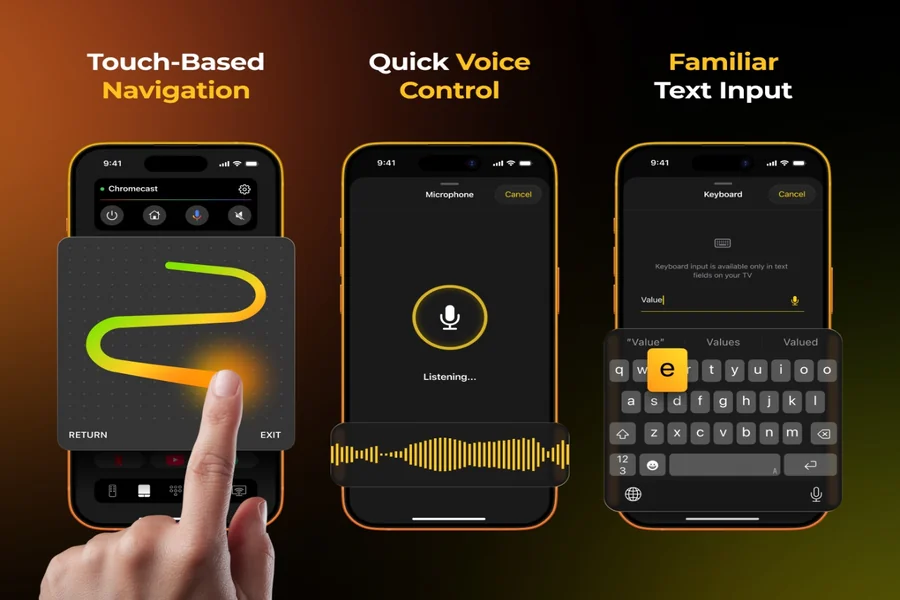
The headline feature is voice control. On supported models, TVRem lets someone talk to their TV using Google Assistant or Alexa to search for shows, switch channels, or adjust volume without touching a screen. For anything that still needs to be typed — a password, a search term, a show title — the app also accepts the iPhone’s native voice-to-text input as an alternative to hunting-and-pecking on an on-screen keyboard, which has traditionally been one of the more frustrating parts of using a streaming box.
Beyond voice, the app functions as a touchpad-style remote: swipe gestures move the cursor around a TV’s interface the way a trackpad would, and a tap selects. It also includes a full keyboard for faster text entry, one-tap launching for apps like Netflix, YouTube, and Prime Video, and standard playback, volume, and channel controls consolidated into a single interface. TVRem currently supports iOS 17 or later and is localized in more than 20 languages, according to its App Store listing, and Electronic Team notes the app is independent and not affiliated with or endorsed by the TV or streaming platform brands it connects to.
Why It Matters
None of this reinvents the remote control conceptually — universal remote apps have existed for years. What has changed is the reliability and depth of voice integration, at a moment when broader industry data shows voice-enabled features are no longer a novelty add-on but an expected part of how people manage connected TVs. As more households run multiple streaming devices side by side, an iPhone remote for TV that can also act as a voice remote app, rather than a second or third clicker on the coffee table, addresses a specific and increasingly common annoyance.
TVRem is free to download, and its full feature set, including the Ukrainian localization added in a recent update, is detailed on itsofficial product page and on the App Store. For anyone tired of digging through couch cushions for a remote, or juggling three different apps to control one TV, it’s a reminder that the phone already in hand can often do the job just as well — sometimes just by asking it to.