Twelve hours. That is how long the average American spends in front of a screen every single day in 2026. Not occasionally. Not during a binge-watching weekend. Every day. If you sleep 7 hours, that leaves just 5 hours where your eyes are not pointed at glowing glass. The number is shocking the first time you hear it, and then you do the math on your own phone and realize it checks out.
So where does all that time actually go? And more practically, what does it mean for the people doing the staring? This piece breaks down the real data, separates the leisure hours from the work hours, and gives you a decision framework you can use to think smarter about your own daily screen load.
Where the Numbers Come From
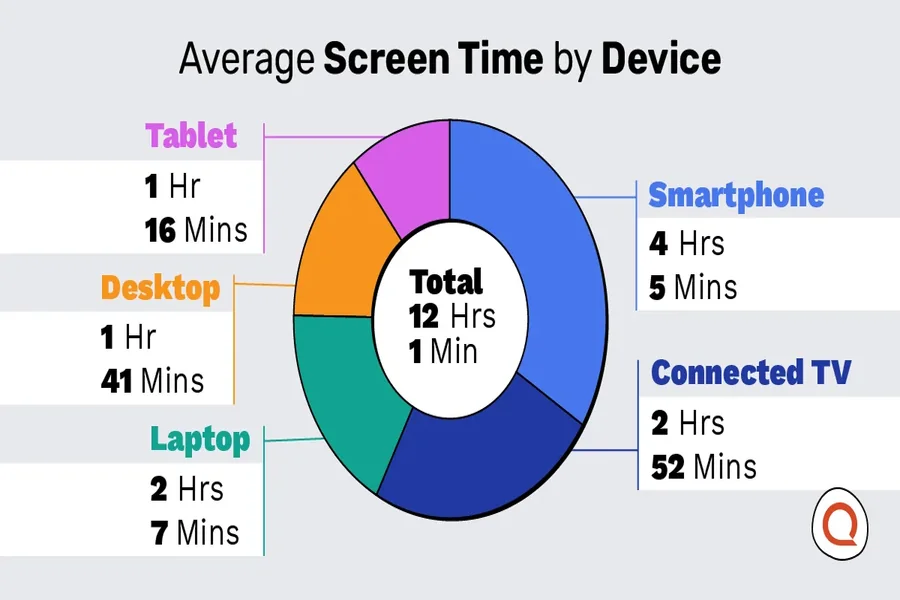
In 2026, Americans logged a daily average of 12 hours and 1 minute of screen time, accumulating to nearly half a day in front of screens, according to a survey of 1,000 Americans by Reviews.org. That figure covers every device: phones, laptops, televisions, tablets, and smartwatches. Smartphones alone account for more than 4 hours of that daily total.
But the government has its own way of counting, and it tells a slightly different story. The Bureau of Labor Statistics tracks what it calls “leisure screen time,” which strips out work-related device use. According to the BLS American Time Use Survey released in June 2024, watching TV was the leisure activity that occupied the most time, at 2.7 hours per day, accounting for over half of all leisure time. People were less likely to spend time watching TV in 2023 than in 2013, dropping from 79 percent to 74 percent of Americans on any given day. Work screens are on top of that. So are the 34 minutes people spent daily on computer-based gaming and social media, also measured separately in the BLS American Time Use Survey 2023.
The honest answer is that the total varies by methodology. Count every device simultaneously, and you get 12 hours. Count unique minutes on screen-based activities, and the number is closer to 7. Both figures tell the same underlying story: Americans spend a staggering proportion of their waking life looking at screens.
The Screen Load Index: A Framework for Thinking About Your Own Day
Most screen-time conversations treat all hours as equal. They are not. I think about daily screen exposure in three distinct categories, which I call the Screen Load Index:
1. Productive load — work emails, video calls, spreadsheets, writing. You cannot cut this easily.
2. Passive load — streaming TV, social media scrolling, YouTube autoplay. This is where the hours silently compound.
3. Mixed load — texting, casual browsing, e-reading. Harder to categorize, easy to undercount.
Here is why this matters practically. A software engineer who racks up 10 screen hours in a day might have 7 hours in the productive category and 3 in passive. A college student with the same 10-hour total might have 2 in productive and 8 in passive. The number on its own means almost nothing. The composition tells you everything about where behavior change is actually possible.
When you audit your own screen time today, open your phone’s weekly report and try sorting your usage into these three buckets. Most people are genuinely surprised how small the productive column turns out to be relative to what they assumed.
Generation Matters More Than You Probably Expect
Screen time is not distributed evenly across age groups. The spread is wide enough that averages can seriously mislead you.
| Generation | Approx. Daily Screen Time | Primary Device
|
|---|---|---|
| Gen Z (ages 15-28) | ~9 hours | Smartphone |
| Millennials (ages 29-44) | ~7 hours | Smartphone + Laptop |
| Gen X (ages 45-60) | ~5-6 hours | TV + Laptop |
| Baby Boomers (ages 61-79) | ~3.5 hours | TV |
Gen Z’s 9-hour daily average means they are, functionally, in front of a screen for every waking moment outside of school, meals, and physical activity. That is not a moral judgment. It is just the arithmetic of their environment. Boomers, for contrast, watch TV as their dominant activity and largely avoid smartphones the way Millennials avoid landlines.
If you are a parent looking at your teenager’s phone and feeling alarmed, the data suggests your alarm is proportionate. If you are a 50-year-old feeling virtuous about your 5 daily hours, the data suggests that number is still higher than most people in that bracket would self-report.
What Blue Light Research Actually Says
The blue-light conversation gets messy fast because the eyewear industry has overclaimed it for years. But there is legitimate workplace productivity research worth knowing.
“This study provides evidence of a very cost-effective means of improving employee sleep and work outcomes, and the implied return on investment is gigantic.”
— Christopher Barnes, Professor of Management, University of Washington Foster School of Business
That quote comes from a study published in the Journal of Applied Psychology by researchers at Indiana University and the University of Washington. The research found that wearing blue-light-filtering glasses is an effective intervention to improve sleep, work engagement, and task performance. Wearing them “creates a form of physiologic darkness, thus improving both sleep quantity and quality,” according to lead researcher Cristiano Guarana of the Indiana University Kelley School of Business. The full study findings from Indiana University also showed that night owls gained the biggest performance improvements because their internal clocks were already misaligned with standard work hours.
That is a real finding. What it does not prove is that blue-light glasses prevent every type of discomfort people attribute to screens. The research is specific: sleep quality and downstream work performance. It says nothing about the more common complaints of dryness or focusing fatigue, which have different causes.
Practical Steps to Actually Manage Your Screen Day
Knowing the data is one thing. Doing something with it is another. Here is how I would approach this if starting from scratch:
1.Run a one-week audit. Use your phone’s built-in Screen Time or Digital Wellbeing app and export a week of data. Do not guess. The actual numbers are almost always worse than the gut estimate.
2.Categorize by Screen Load type. Sort your app usage into the three buckets above. Identify your biggest passive-load offender, which for most people is a short-form video app.
3. Set a single passive-load limit, not a total limit. Total limits fail because they penalize productive use. Capping just the passive category is both achievable and sustainable.
4. Apply the 20-20-20 rule during work hours. Every 20 minutes, look at something 20 feet away for 20 seconds. This is a well-documented practice for reducing eye fatigue during extended computer sessions.
5. Schedule a baseline vision check. If you have not had your eyes examined in over a year, your screen-time habits have probably outpaced your last prescription. Booking an eye exam in College Station, TX, gives you a baseline measurement to work from, so you know whether your fatigue is behavioral or structural.
The One Metric Most People Ignore
Everyone talks about total hours. Almost nobody talks about pickup frequency. Research consistently shows that habitual, short interactions with a phone, checking a notification, glancing at a message, opening an app out of reflex, generate more cognitive fatigue than the same total minutes spent in one intentional sitting.
Interruptions fragment attention in ways that sustained use does not. A two-hour movie is easier on your focus than 120 one-minute social media checks, even though the math is identical. If you want to reduce the real cost of your screen time, reducing your pickup count is at least as important as reducing your total minutes. Turn off non-essential notifications today, not next week.
The screen-time problem is not really a technology problem. It is a design problem and an attention-economy problem. The apps pulling the most passive-load hours were built specifically to be difficult to put down. Knowing that changes the conversation from willpower to environment design. Build a phone environment that makes the default action difficult, not easy, and your hours will drop without the exhausting effort of constant resistance.