There is no single price for Clover. Clover POS systems combine three separate cost buckets — hardware, monthly software subscription, and per-transaction processing fees — and the total varies by business type, plan tier, number of terminals, and which reseller you buy through. If someone quotes you a single monthly number without breaking it down, ask them to itemize it. Here is what each layer actually costs and what to verify before you sign anything.
The Three Cost Buckets You Need to Separate
Separate upfront costs from recurring charges. Hardware may be purchased outright or paid for over a contract term; software, processing, and paid apps have their own billing terms. An itemized quote makes those differences visible.
Here is a clean breakdown of what you are actually paying for:
- Hardware: Purchase, financing, and equipment subscription have different ownership and end-of-term conditions. Compare the total payments and any buyout obligation.
- Software plan: Monthly subscription per device or location. Determines which features you can actually use.
- Processing fees: Per-transaction percentage plus a fixed cent amount. This scales directly with your card volume.
- App Marketplace add-ons: Third-party apps billed separately — loyalty programs, payroll, advanced reporting.
- Setup, installation, training: Sometimes bundled, sometimes not. Confirm in writing.
Compare the combined cost over the same period. A lower hardware payment does not by itself make an offer cheaper once software, processing, apps, and contract charges are included.
Hardware Costs: Choose the Device and Payment Arrangement
Hardware prices depend on the model, configuration, seller, and payment arrangement. Start by matching each device to the work it needs to handle:
- Clover Go — a mobile card reader paired with a compatible smartphone.
- Countertop reader — confirm the exact model and what the quoted package includes.
- Clover Flex — a handheld terminal for mobile and tableside payments.
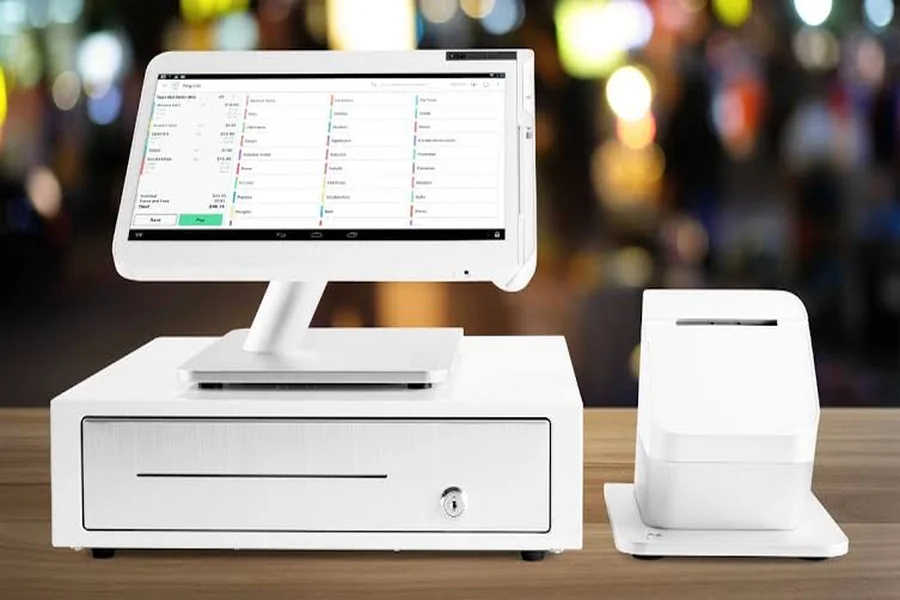
- Clover Mini — a compact countertop POS device.
- Clover Station models — Solo has a merchant-facing screen; Duo adds a customer-facing screen. Specify the model and included equipment in the quote.
For financing or an equipment subscription, calculate all payments over the contract term, including any buyout. Confirm who owns the hardware, whether cancellation is permitted, and what must be paid or returned at the end. Clover.com equipment subscriptions have their own cancellation and end-of-term conditions; a monthly payment is not the same as ownership.
Confirm when equipment and software billing begin and which charges apply from activation. Do not assume that a delayed first bill means a free software period.
Software Plans: Monthly Fees by Business Type
Clover’s current full-service restaurant comparison lists Starter, Standard, and Advanced bundles, with Restaurant Growth in the software row for each. Those bundle names should not be treated as three separate software tiers. Ask the seller to separate software charges from equipment payments and identify fees for additional devices and apps; Clover.com pricing applies to purchases through Clover.com.
For a small restaurant, match the proposed software and apps to table management, modifiers, split checks, online ordering, and employee tools. Have the seller demonstrate the functions you need and identify which are included and which require a separate subscription.
Check these specifics before choosing a plan:
- Does the plan include table mapping, or is that an add-on app?
- How many employee logins are included?
- Is online ordering integration included, or does it require a third-party app with its own monthly fee?
- Does the plan price change if you add a second terminal?
Processing Fees: Where the Real Money Moves
Processing charges may include a percentage of card sales plus a fixed amount per transaction. The applicable schedule depends on the agreement and payment channel. For illustration only, a hypothetical 2.5% + 10¢ schedule would charge $2.60 on a $100 payment; this is not a Clover or Smart rate quote.
Small rate differences matter at volume. At an assumed $30,000 in monthly card sales, a 0.2 percentage-point difference equals $60 in percentage fees, before per-transaction and other charges. Compare quotes using the same sales volume and transaction count.
What determines your actual rate:
- Which plan tier you are on
- The mix of in-person, manually keyed, and online payments
- Which reseller or bank you purchase through — rates are not always identical across all Clover resellers
Online and phone orders do not automatically share one keyed-in rate. Ask for the applicable online, manually keyed, and in-person schedules, then estimate each channel separately using its expected volume and transaction count.
Two Restaurant Scenarios: Illustrative Setup Budgets
Scenario A — Counter-service café, single terminal: Assume hardware costs $900, accessories $100, and setup $200, all paid upfront: $900 + $100 + $200 = $1,200. Assume software is $60/month, with no paid apps or extra-device fees. At $30,000 in monthly card sales across 1,000 transactions, an illustrative 2.5% + 10¢ processing schedule produces $750 + $100 = $850 in processing charges. The modeled monthly total is $850 + $60 = $910. These figures are budgeting assumptions, not Clover or Smart prices or an available package.
Scenario B — Full-service restaurant, countertop plus tableside: Assume a Station Duo and two Flex devices cost $3,000 together, with $200 in accessories and $300 in setup: $3,000 + $200 + $300 = $3,500 upfront. Assume monthly software costs $120, extra-device charges $30, and paid apps $20: $120 + $30 + $20 = $170. At $60,000 in monthly card sales across 1,500 transactions, the same illustrative 2.5% + 10¢ schedule produces $1,500 + $150 = $1,650 in processing charges. The modeled monthly total is $1,650 + $170 = $1,820. Every amount is an assumption, not a Clover or Smart offer.
Both examples assume outright hardware purchase and exclude taxes, shipping, and other charges. Actual device availability, software prices, processing schedules, and contract terms require a quote. The monthly totals also use different sales volumes and transaction counts, so their difference is not a measure of the cost of adding tableside devices.
Clover Flex: The Tableside Terminal Worth Budgeting Separately
A handheld terminal lets a server take payment at the table. Size the device pool around simultaneous payment demand, staff workflow, charging, and connectivity. Clover Flex for tableside payments is listed by Smart Payment Solutions with hardware from $549. Confirm the current model, availability, and included equipment; software and processing need separate line items.
Confirm whether additional Flex devices add a monthly charge and whether the quoted software fee is per device or per location. Include those charges in the same budget as any required apps.
Where Quotes Diverge: Clover.com vs. Banks vs. Independent Resellers
Clover hardware and software are available through Clover.com, banks, payment processors, and independent resellers. Compare each written offer on its actual devices, software, processing agreement, contract terms, and support responsibilities.
Do not infer price, contract flexibility, or support quality from the sales channel alone. Identify who provides installation, training, and ongoing support, what those services cost, and how the agreement handles cancellation or equipment replacement.
When comparing quotes, use identical hardware models, software features, monthly card volume, transaction counts, payment-channel mix, and contract length. Add upfront costs, all recurring charges, and any end-of-term obligations over the same period.
Pre-Signing Checklist for Restaurant Owners
Before you sign anything, confirm the following in writing:
- Exact monthly software fee and whether it changes with additional devices
- Applicable processing schedules for in-person, manually keyed, and online payments
- Hardware ownership — do you own it outright at purchase, or is it leased?
- Contract length and early termination fee, if any
- Which apps are included vs. billed separately from the Clover App Market
- Who handles installation, training, and technical support — and at what cost
- Billing start dates and the written terms of any promotional discount
Request an itemized quote from Smart Payment Solutions for your restaurant’s devices, software, apps, and support needs. Share your expected card volume, transaction count, and mix of in-person and remote payments so the quote can separate upfront charges from recurring costs and processing fees.